
How to mitigate LED light flicker
LED light can unfortunately cause flickering in the video image when used in combination with high frame rate cameras. It’s also worth noting that not only do LED lights sometimes flicker but also other equipment such as projectors and other lighting in or around your facilities may contribute to visual disturbances in the video image.
Here is an illustration of how what camera’s frame rate & shutter speed looks like in comparison to a LED that flickers:
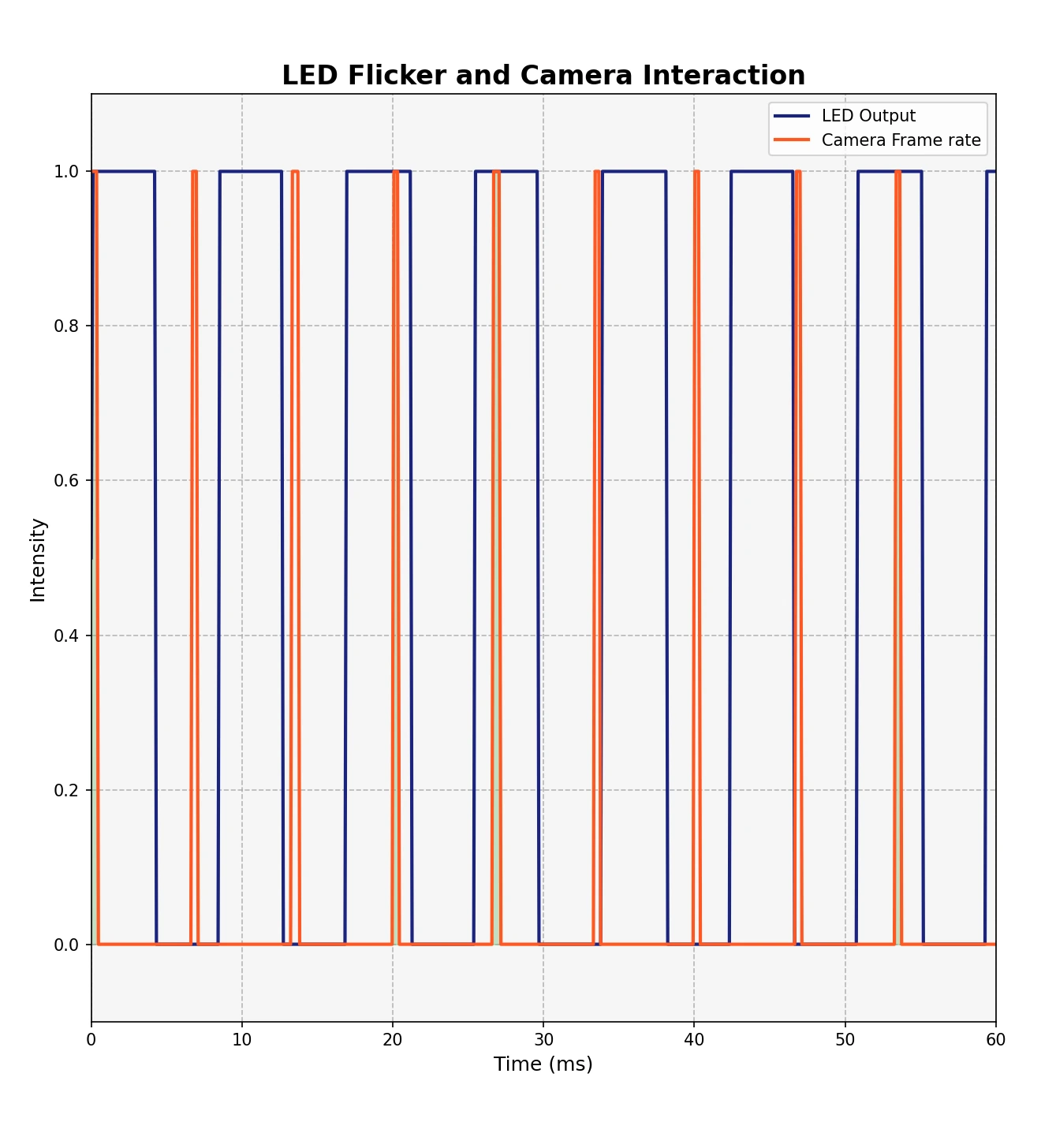
The blue square wave’s high period is when the LED is on.
The orange square wave’s high period is when the camera is capturing an image.
In this example you can see the camera takes pictures during the off period of the LED, this alternation between on & off causes flickering when the camera takes one image with the LED on and one the LED off. We can mitigate this, please see below.
Generally LED flicker is caused by:
Bad Power Supply: LED lights typically operate on direct current (DC) but are often powered by alternating current (AC) through a rectifier. The conversion from AC to DC isn’t always perfectly smooth and can cause the LEDs to flicker at twice the frequency of the AC power supply (100 Hz where mains is 50 Hz, 120 Hz where it is 60 Hz). This pulsating effect can be captured as flicker by high-speed cameras, which have a higher frame rate than the frequency of the flicker.
PWM Dimming: If the LED lights are dimmable, they might use Pulse Width Modulation (PWM) for dimming. PWM rapidly turns the LEDs on and off to adjust the brightness. Although this flickering is generally too fast to be seen by the human eye, a high-speed camera can capture these rapid on-off cycles as flicker. Generally this is a higher frequency than 60Hz.
If the frame rate is very mismatched to the LED flicker frequency the flicker may be even more pronounced.
Frame Rate Mismatch: The frame rate of the high-speed camera might not be synchronized with the flicker frequency of the LEDs. For example, if the LED flicker frequency is not a whole multiple of the camera’s frame rate, each frame catches the light at a different point in its on-off cycle, and the flickering will be more pronounced in the recorded footage.
How to mitigate or reduce flickering
Use High-Quality LEDs: High-quality LED lights with better power supply circuits tend to have less flicker. (Please see our webshop or contact sales)
High Frequency PWM: Use LED lights with a high-frequency PWM dimming method that operates at a frequency beyond the capture capability of the camera.
Adjust Camera Settings: Synchronizing the camera’s frame rate with the frequency of the LED flicker can help minimize the visible flicker. Choose a frame rate that divides evenly into the flicker frequency. Lights on 60 Hz mains usually flicker at 120 Hz, so try 120, 60 or 30 FPS. Lights on 50 Hz mains usually flicker at 100 Hz, so try 100, 50 or 25 FPS.
In the example below we change the frame rate of the camera, notice how it changes where within the on period of the LED the picture is taken. By matching the frame rate with the flicker frequency, and adjusting the shutter speed we can minimize the amount of flicker.